Here you can browse the reference documentation for Skyramp client applications.

This is the multi-page printable view of this section. Click here to print.
Reference
Skyramp reference documentation
- 1: Architecture
- 2: CLI Commands
- 2.1: skyramp
- 2.2: cluster
- 2.3: completion
- 2.4: dashboard
- 2.5: deployer
- 2.5.1: clean
- 2.5.2: coverage
- 2.5.3: down
- 2.5.4: generate
- 2.5.4.1: kubernetes
- 2.5.5: status
- 2.5.6: up
- 2.6: init
- 2.6.1: mock
- 2.6.1.1: grpc
- 2.6.1.2: jsonrpc-http
- 2.6.1.3: jsonrpc-ws
- 2.6.1.4: rest
- 2.6.2: project
- 2.6.3: target
- 2.6.4: test
- 2.6.4.1: grpc
- 2.6.4.2: jsonrpc-http
- 2.6.4.3: jsonrpc-ws
- 2.6.4.4: rest
- 2.7: logs
- 2.8: mocker
- 2.8.1: apply
- 2.8.2: delete
- 2.8.3: generate
- 2.8.3.1: grpc
- 2.8.3.2: jsonrpc-http
- 2.8.3.3: jsonrpc-ws
- 2.8.3.4: rest
- 2.8.3.5: rest-protobuf
- 2.8.4: status
- 2.8.4.1: response
- 2.9: resolver
- 2.10: tester
- 2.10.1: curl
- 2.10.2: generate
- 2.10.2.1: graphql
- 2.10.2.2: grpc
- 2.10.2.3: rest
- 2.10.2.4: rest-protobuf
- 2.10.3: start
- 2.10.4: status
- 2.10.5: stop
- 2.11: validate
- 2.12: version
- 2.13: viz
- 3: Dashboard
- 4: Libraries
- 5: VSCode Extension
1 - Architecture
Learn about the high level architecture of Skyramp
Docker Architecture

There are three main components that form the core of Skyramp:
- Skyramp Library
- Skyramp Worker
- Skyramp Clients
Skyramp Library
Skyramp exposes all the key abstractions needed for distributed testing through the Skyramp Library on the client side. The Skyramp Library interacts with the Skyramp Worker deployed in-cluster to implement service mocking and testing, available as Mocker and Tester respectively.
In addition to Mocker and Tester, there is a separate client side abstraction exposed by the Library — Deployer. Deployer allows you to deploy a subset of your application given a Helm Chart.
For inner dev loop testing you can access the functionality of the library through our Clients. Alternatively, you can directly use the libraries in your CI pipelines to create custom testing solutions.
Skyramp Worker
The Skyramp Worker implements the core functionality of Mocker and Tester. It is deployed via Docker Compose into your cluster. You can communicate with the Worker either directly via the Library or by using Skyramp Clients. The Worker provides several management features that are useful for testing and development including running and managing mocks, generating load for tests, managing and visualizing tests and more.
Skyramp Clients
Skyramp provides a Terminal client and a VSCode Extension for inner dev loop testing.
Terminal Client
The Terminal Client has a comprehensive list of CLI Commands you can use in ad-hoc testing. To install, visit the Install Client page.
VSCode Extension
The VSCode Extension is a visual way to interact with Skyramp right from your development environment. For more info, visit the VSCode Extension page.
Cluster Orchestration
Skyramp supports Docker Compose for orchestration as shown in the architecture diagram.
2 - CLI Commands
List of commands for the Skyramp terminal client
2.1 - skyramp
Command line tool to interact with Skyramp
skyramp
skyramp
Options
      --kube-insecure         enable insecure mode for interactions with Kubernetes clusters
  -p, --project-path string   path to Skyramp project folder (default ".")
  -v, --verbose count         verbose (-v or -vv)
SEE ALSO
- cluster - Manage Kubernetes clusters
- completion - Generate the autocompletion script for the specified shell
- dashboard - Manage dashboard
- deployer - Manage target services
- init - Create description template
- logs - Retrieve debug, usage, and cluster create logs
- mocker - Manage mocks
- resolver - Manage DNS Resolver
- tester - Manage tests
- validate - Validate description
- version - Show version
- viz - (beta) Run terminal UI for Skyramp
2.2 - cluster
Manage Kubernetes clusters
skyramp cluster
skyramp cluster
Options
--airgap enable airgap mode (only supported for local clusters)
Options inherited from parent commands
      --kube-insecure         enable insecure mode for interactions with Kubernetes clusters
  -p, --project-path string   path to Skyramp project folder (default ".")
  -v, --verbose count         verbose (-v or -vv)
SEE ALSO
2.2.1 - create
Create a new Kubernetes cluster
skyramp cluster create
Create a new local cluster or register an existing Kubernetes cluster.
skyramp cluster create [flags]
Options
  -d, --dashboard     install dashboard
      --listen-any    Kind API server listens to any address, default is localhost
  -l, --local         local cluster
  -n, --name string   name of the cluster to be created
Options inherited from parent commands
      --airgap                enable airgap mode (only supported for local clusters)
      --kube-insecure         enable insecure mode for interactions with Kubernetes clusters
  -p, --project-path string   path to Skyramp project folder (default ".")
  -v, --verbose count         verbose (-v or -vv)
SEE ALSO
- cluster - Manage Kubernetes clusters
2.2.2 - current
Show current cluster
skyramp cluster current
skyramp cluster current
Options inherited from parent commands
      --airgap                enable airgap mode (only supported for local clusters)
      --kube-insecure         enable insecure mode for interactions with Kubernetes clusters
  -p, --project-path string   path to Skyramp project folder (default ".")
  -v, --verbose count         verbose (-v or -vv)
SEE ALSO
- cluster - Manage Kubernetes clusters
2.2.3 - ingress
Manage ingress
skyramp cluster ingress
skyramp cluster ingress
Options inherited from parent commands
      --airgap                enable airgap mode (only supported for local clusters)
      --kube-insecure         enable insecure mode for interactions with Kubernetes clusters
  -p, --project-path string   path to Skyramp project folder (default ".")
  -v, --verbose count         verbose (-v or -vv)
SEE ALSO
2.2.3.1 - down
Delete ingress
skyramp cluster ingress down
skyramp cluster ingress down [flags]
Options
  -c, --cluster string              cluster context for Skyramp
      --kubernetes-service string   Kubernetes service list separated by comma
  -n, --namespace string            valid Kubernetes namespace
Options inherited from parent commands
      --airgap                enable airgap mode (only supported for local clusters)
      --kube-insecure         enable insecure mode for interactions with Kubernetes clusters
  -p, --project-path string   path to Skyramp project folder (default ".")
  -v, --verbose count         verbose (-v or -vv)
SEE ALSO
- ingress - Manage ingress
2.2.3.2 - up
Create ingress
skyramp cluster ingress up
skyramp cluster ingress up [flags]
Options
  -c, --cluster string              cluster context for Skyramp
      --kubernetes-service string   Kubernetes service list separated by comma
  -n, --namespace string            valid Kubernetes namespace
      --protocol string             protocol to use for the ingress generation (one of [grpc rest thrift])
Options inherited from parent commands
      --airgap                enable airgap mode (only supported for local clusters)
      --kube-insecure         enable insecure mode for interactions with Kubernetes clusters
  -p, --project-path string   path to Skyramp project folder (default ".")
  -v, --verbose count         verbose (-v or -vv)
SEE ALSO
- ingress - Manage ingress
2.2.4 - list
List registered clusters
skyramp cluster list
skyramp cluster list
Options inherited from parent commands
      --airgap                enable airgap mode (only supported for local clusters)
      --kube-insecure         enable insecure mode for interactions with Kubernetes clusters
  -p, --project-path string   path to Skyramp project folder (default ".")
  -v, --verbose count         verbose (-v or -vv)
SEE ALSO
- cluster - Manage Kubernetes clusters
2.2.5 - register
Register kubeconfig of a pre-provisioned cluster
skyramp cluster register
Register kubeconfig of a pre-provisioned cluster. Alternative to ‘skyramp config apply’.
skyramp cluster register <kubeconfig-file-path> [flags]
Options
      --context string    k8s context
  -d, --dashboard         install dashboard
      --install-ingress   deploy skyramp ingress controller
  -n, --name string       name of the cluster to be created
Options inherited from parent commands
      --airgap                enable airgap mode (only supported for local clusters)
      --kube-insecure         enable insecure mode for interactions with Kubernetes clusters
  -p, --project-path string   path to Skyramp project folder (default ".")
  -v, --verbose count         verbose (-v or -vv)
SEE ALSO
- cluster - Manage Kubernetes clusters
2.2.6 - remove
Delete cluster
skyramp cluster remove
skyramp cluster remove [flags]
Options
  -l, --local         local cluster
  -n, --name string   name of the cluster to be removed
Options inherited from parent commands
      --airgap                enable airgap mode (only supported for local clusters)
      --kube-insecure         enable insecure mode for interactions with Kubernetes clusters
  -p, --project-path string   path to Skyramp project folder (default ".")
  -v, --verbose count         verbose (-v or -vv)
SEE ALSO
- cluster - Manage Kubernetes clusters
2.2.7 - switch
Select current cluster
skyramp cluster switch
skyramp cluster switch <cluster name>
Options inherited from parent commands
      --airgap                enable airgap mode (only supported for local clusters)
      --kube-insecure         enable insecure mode for interactions with Kubernetes clusters
  -p, --project-path string   path to Skyramp project folder (default ".")
  -v, --verbose count         verbose (-v or -vv)
SEE ALSO
- cluster - Manage Kubernetes clusters
2.3 - completion
Generate the autocompletion script for the specified shell
skyramp completion
skyramp completion <shell>
Options inherited from parent commands
      --kube-insecure         enable insecure mode for interactions with Kubernetes clusters
  -p, --project-path string   path to Skyramp project folder (default ".")
  -v, --verbose count         verbose (-v or -vv)
SEE ALSO
2.3.1 - off
Disable autocompletion for Skyramp
skyramp completion off
skyramp completion off <shell>
Options inherited from parent commands
      --kube-insecure         enable insecure mode for interactions with Kubernetes clusters
  -p, --project-path string   path to Skyramp project folder (default ".")
  -v, --verbose count         verbose (-v or -vv)
SEE ALSO
- completion - Generate the autocompletion script for the specified shell
2.3.2 - on
Enable autocompletion for Skyramp
skyramp completion on
skyramp completion on <shell>
Options inherited from parent commands
      --kube-insecure         enable insecure mode for interactions with Kubernetes clusters
  -p, --project-path string   path to Skyramp project folder (default ".")
  -v, --verbose count         verbose (-v or -vv)
SEE ALSO
- completion - Generate the autocompletion script for the specified shell
2.4 - dashboard
Manage dashboard
skyramp dashboard
skyramp dashboard
Options inherited from parent commands
      --kube-insecure         enable insecure mode for interactions with Kubernetes clusters
  -p, --project-path string   path to Skyramp project folder (default ".")
  -v, --verbose count         verbose (-v or -vv)
SEE ALSO
2.4.1 - down
Bring down dashboard
skyramp dashboard down
skyramp dashboard down [flags]
Options
-g, --grafana force dashboard installation/update
Options inherited from parent commands
      --kube-insecure         enable insecure mode for interactions with Kubernetes clusters
  -p, --project-path string   path to Skyramp project folder (default ".")
  -v, --verbose count         verbose (-v or -vv)
SEE ALSO
- dashboard - Manage dashboard
2.4.2 - up
Bring up dashboard
skyramp dashboard up
Bring up dashboard (Skyramp by default)
skyramp dashboard up [flags]
Options
  -d, --docker    open the Skyramp dashboard deployed on Docker
  -f, --force     force dashboard installation/update
  -g, --grafana   bring up Grafana dashboard
Options inherited from parent commands
      --kube-insecure         enable insecure mode for interactions with Kubernetes clusters
  -p, --project-path string   path to Skyramp project folder (default ".")
  -v, --verbose count         verbose (-v or -vv)
SEE ALSO
- dashboard - Manage dashboard
2.5 - deployer
Manage target services
skyramp deployer
skyramp deployer
Options inherited from parent commands
      --kube-insecure         enable insecure mode for interactions with Kubernetes clusters
  -p, --project-path string   path to Skyramp project folder (default ".")
  -v, --verbose count         verbose (-v or -vv)
SEE ALSO
- skyramp - Command line tool to interact with Skyramp
- clean - Remove all Kubernetes resources deployed by Skyramp
- coverage - Configures or retrieves coverage data
- down - Tear down target services
- generate - Generates configurations from an existing deployment
- status - Show details for deployed targets
- up - Bring up target services
2.5.1 - clean
Remove all Kubernetes resources deployed by Skyramp
skyramp deployer clean
Remove all Kubernetes resources deployed by Skyramp from a cluster. Note that this will not clean up the cluster(s) and infrastructure.
skyramp deployer clean
Options
-c, --cluster string cluster context for Skyramp
Options inherited from parent commands
      --kube-insecure         enable insecure mode for interactions with Kubernetes clusters
  -p, --project-path string   path to Skyramp project folder (default ".")
  -v, --verbose count         verbose (-v or -vv)
SEE ALSO
- deployer - Manage target services
2.5.2 - coverage
Configures or retrieves coverage data
skyramp deployer coverage
skyramp deployer coverage [flags]
Options
-n, --namespace string Kubernetes namespace
Options inherited from parent commands
      --kube-insecure         enable insecure mode for interactions with Kubernetes clusters
  -p, --project-path string   path to Skyramp project folder (default ".")
  -v, --verbose count         verbose (-v or -vv)
SEE ALSO
2.5.2.1 - collect
Retrieves coverage data
skyramp deployer coverage collect
skyramp deployer coverage collect [flags]
Options
      --api-schema strings         schema file(s) to use for the coverage data
      --code-coverage-out string   output directory for the code coverage data (default "/tmp/cover")
      --protocol string            protocol to use for the schema files (one of [rest]) (default "rest")
Options inherited from parent commands
      --kube-insecure         enable insecure mode for interactions with Kubernetes clusters
  -p, --project-path string   path to Skyramp project folder (default ".")
  -v, --verbose count         verbose (-v or -vv)
SEE ALSO
- coverage - Configures or retrieves coverage data
2.5.2.2 - restart
Resets the collected coverage data
skyramp deployer coverage restart
skyramp deployer coverage restart <target-name>
Options inherited from parent commands
      --kube-insecure         enable insecure mode for interactions with Kubernetes clusters
  -p, --project-path string   path to Skyramp project folder (default ".")
  -v, --verbose count         verbose (-v or -vv)
SEE ALSO
- coverage - Configures or retrieves coverage data
2.5.3 - down
Tear down target services
skyramp deployer down
skyramp deployer down <target name> [flags]
Options
  -c, --cluster string     cluster context for Skyramp
  -f, --force              force delete the target
  -n, --namespace string   Kubernetes namespace
Options inherited from parent commands
      --kube-insecure         enable insecure mode for interactions with Kubernetes clusters
  -p, --project-path string   path to Skyramp project folder (default ".")
  -v, --verbose count         verbose (-v or -vv)
SEE ALSO
- deployer - Manage target services
2.5.4 - generate
Generates configurations from an existing deployment
skyramp deployer generate
skyramp deployer generate
Options
      --api-coverage      generate and pull API coverage data
      --code-coverage     generate and pull code coverage data
      --protocol string   protocol to use for the deployer configuration (one of [rest]) (default "rest")
Options inherited from parent commands
      --kube-insecure         enable insecure mode for interactions with Kubernetes clusters
  -p, --project-path string   path to Skyramp project folder (default ".")
  -v, --verbose count         verbose (-v or -vv)
SEE ALSO
- deployer - Manage target services
- kubernetes - Generates configurations from an existing deployment in Kubernetes
2.5.4.1 - kubernetes
Generates configurations from an existing deployment in Kubernetes
skyramp deployer generate kubernetes
skyramp deployer generate kubernetes [flags]
Options
      --kubeconfig string   path of the kubeconfig where
      --namespace string    namespace where the application is deployed
Options inherited from parent commands
      --api-coverage          generate and pull API coverage data
      --code-coverage         generate and pull code coverage data
      --kube-insecure         enable insecure mode for interactions with Kubernetes clusters
  -p, --project-path string   path to Skyramp project folder (default ".")
      --protocol string       protocol to use for the deployer configuration (one of [rest]) (default "rest")
  -v, --verbose count         verbose (-v or -vv)
SEE ALSO
- generate - Generates configurations from an existing deployment
2.5.5 - status
Show details for deployed targets
skyramp deployer status
skyramp deployer status
Options
-c, --cluster string cluster context for Skyramp
Options inherited from parent commands
      --kube-insecure         enable insecure mode for interactions with Kubernetes clusters
  -p, --project-path string   path to Skyramp project folder (default ".")
  -v, --verbose count         verbose (-v or -vv)
SEE ALSO
- deployer - Manage target services
2.5.6 - up
Bring up target services
skyramp deployer up
skyramp deployer up <target name> [flags]
Options
  -c, --cluster string        cluster context for Skyramp
      --local-images          load local container images
  -n, --namespace string      Kubernetes namespace
      --skip-deploy-worker
      --worker-image string   worker image URL
Options inherited from parent commands
      --kube-insecure         enable insecure mode for interactions with Kubernetes clusters
  -p, --project-path string   path to Skyramp project folder (default ".")
  -v, --verbose count         verbose (-v or -vv)
SEE ALSO
- deployer - Manage target services
2.6 - init
Create description template
skyramp init
skyramp init
Options
-f, --force force create description
Options inherited from parent commands
      --kube-insecure         enable insecure mode for interactions with Kubernetes clusters
  -p, --project-path string   path to Skyramp project folder (default ".")
  -v, --verbose count         verbose (-v or -vv)
SEE ALSO
2.6.1 - mock
Create mock description
skyramp init mock
skyramp init mock
Options inherited from parent commands
  -f, --force                 force create description
      --kube-insecure         enable insecure mode for interactions with Kubernetes clusters
  -p, --project-path string   path to Skyramp project folder (default ".")
  -v, --verbose count         verbose (-v or -vv)
SEE ALSO
- init - Create description template
- grpc - Create mock description for gRPC protocol
- jsonrpc-http - Create mock description for JSON-RPC over HTTP protocol
- jsonrpc-ws - Create mock description for JSON-RPC over WebSocket protocol
- rest - Create mock description for REST protocol
2.6.1.1 - grpc
Create mock description for gRPC protocol
skyramp init mock grpc
skyramp init mock grpc <mock name>
Options inherited from parent commands
  -f, --force                 force create description
      --kube-insecure         enable insecure mode for interactions with Kubernetes clusters
  -p, --project-path string   path to Skyramp project folder (default ".")
  -v, --verbose count         verbose (-v or -vv)
SEE ALSO
- mock - Create mock description
2.6.1.2 - jsonrpc-http
Create mock description for JSON-RPC over HTTP protocol
skyramp init mock jsonrpc-http
skyramp init mock jsonrpc-http <mock name>
Options inherited from parent commands
  -f, --force                 force create description
      --kube-insecure         enable insecure mode for interactions with Kubernetes clusters
  -p, --project-path string   path to Skyramp project folder (default ".")
  -v, --verbose count         verbose (-v or -vv)
SEE ALSO
- mock - Create mock description
2.6.1.3 - jsonrpc-ws
Create mock description for JSON-RPC over WebSocket protocol
skyramp init mock jsonrpc-ws
skyramp init mock jsonrpc-ws <mock name>
Options inherited from parent commands
  -f, --force                 force create description
      --kube-insecure         enable insecure mode for interactions with Kubernetes clusters
  -p, --project-path string   path to Skyramp project folder (default ".")
  -v, --verbose count         verbose (-v or -vv)
SEE ALSO
- mock - Create mock description
2.6.1.4 - rest
Create mock description for REST protocol
skyramp init mock rest
skyramp init mock rest <mock name>
Options inherited from parent commands
  -f, --force                 force create description
      --kube-insecure         enable insecure mode for interactions with Kubernetes clusters
  -p, --project-path string   path to Skyramp project folder (default ".")
  -v, --verbose count         verbose (-v or -vv)
SEE ALSO
- mock - Create mock description
2.6.2 - project
Create folder structure for a new Skyramp project
skyramp init project
skyramp init project <project name>
Options inherited from parent commands
  -f, --force                 force create description
      --kube-insecure         enable insecure mode for interactions with Kubernetes clusters
  -p, --project-path string   path to Skyramp project folder (default ".")
  -v, --verbose count         verbose (-v or -vv)
SEE ALSO
- init - Create description template
2.6.3 - target
Create target description
skyramp init target
skyramp init target <target name>
Options inherited from parent commands
  -f, --force                 force create description
      --kube-insecure         enable insecure mode for interactions with Kubernetes clusters
  -p, --project-path string   path to Skyramp project folder (default ".")
  -v, --verbose count         verbose (-v or -vv)
SEE ALSO
- init - Create description template
2.6.4 - test
Create test description
skyramp init test
skyramp init test
Options inherited from parent commands
  -f, --force                 force create description
      --kube-insecure         enable insecure mode for interactions with Kubernetes clusters
  -p, --project-path string   path to Skyramp project folder (default ".")
  -v, --verbose count         verbose (-v or -vv)
SEE ALSO
- init - Create description template
- grpc - Create test description for gRPC protocol
- jsonrpc-http - Create test description for JSON-RPC over HTTP protocol
- jsonrpc-ws - Create test description for JSON-RPC over WebSocket protocol
- rest - Create test description for REST protocol
2.6.4.1 - grpc
Create test description for gRPC protocol
skyramp init test grpc
skyramp init test grpc <test name>
Options inherited from parent commands
  -f, --force                 force create description
      --kube-insecure         enable insecure mode for interactions with Kubernetes clusters
  -p, --project-path string   path to Skyramp project folder (default ".")
  -v, --verbose count         verbose (-v or -vv)
SEE ALSO
- test - Create test description
2.6.4.2 - jsonrpc-http
Create test description for JSON-RPC over HTTP protocol
skyramp init test jsonrpc-http
skyramp init test jsonrpc-http <test name>
Options inherited from parent commands
  -f, --force                 force create description
      --kube-insecure         enable insecure mode for interactions with Kubernetes clusters
  -p, --project-path string   path to Skyramp project folder (default ".")
  -v, --verbose count         verbose (-v or -vv)
SEE ALSO
- test - Create test description
2.6.4.3 - jsonrpc-ws
Create test description for JSON-RPC over WebSocket protocol
skyramp init test jsonrpc-ws
skyramp init test jsonrpc-ws <test name>
Options inherited from parent commands
  -f, --force                 force create description
      --kube-insecure         enable insecure mode for interactions with Kubernetes clusters
  -p, --project-path string   path to Skyramp project folder (default ".")
  -v, --verbose count         verbose (-v or -vv)
SEE ALSO
- test - Create test description
2.6.4.4 - rest
Create test description for REST protocol
skyramp init test rest
skyramp init test rest <test name>
Options inherited from parent commands
  -f, --force                 force create description
      --kube-insecure         enable insecure mode for interactions with Kubernetes clusters
  -p, --project-path string   path to Skyramp project folder (default ".")
  -v, --verbose count         verbose (-v or -vv)
SEE ALSO
- test - Create test description
2.7 - logs
Retrieve debug, usage, and cluster create logs
skyramp logs
skyramp logs [flags]
Examples
  skyramp logs container-name -t target-name        # Get debug logs
  skyramp logs --cluster-create                     # Get cluster create logs
Options
  -c, --cluster string   cluster context for Skyramp
      --cluster-create   retrieve logs from cluster creation
  -f, --follow           stream logs
  -t, --target string    target which will contain the container
Options inherited from parent commands
      --kube-insecure         enable insecure mode for interactions with Kubernetes clusters
  -p, --project-path string   path to Skyramp project folder (default ".")
  -v, --verbose count         verbose (-v or -vv)
SEE ALSO
- skyramp - Command line tool to interact with Skyramp
2.8 - mocker
Manage mocks
skyramp mocker
skyramp mocker
Options inherited from parent commands
      --kube-insecure         enable insecure mode for interactions with Kubernetes clusters
  -p, --project-path string   path to Skyramp project folder (default ".")
  -v, --verbose count         verbose (-v or -vv)
SEE ALSO
2.8.1 - apply
Update mock configurations to the running worker container
skyramp mocker apply
skyramp mocker apply <mock file> [flags]
Examples
  skyramp mocker apply -n namespace            # Apply mocks to the worker container running on Kubernetes
  skyramp mocker apply -a localhost:35142      # Apply mocks to the worker container running on Docker
Options
  -a, --address string     ip:port of Skyramp worker
  -c, --cluster string     cluster context for Skyramp
      --endpoint string    endpoint to use for mocking
      --method string      method to use for mocking (endpoint argument must be specified)
  -n, --namespace string   Kubernetes namespace where Skyramp worker resides
      --value string       response value to use for mocking (endpoint and method arguments must be specified)
Options inherited from parent commands
      --kube-insecure         enable insecure mode for interactions with Kubernetes clusters
  -p, --project-path string   path to Skyramp project folder (default ".")
  -v, --verbose count         verbose (-v or -vv)
SEE ALSO
- mocker - Manage mocks
2.8.2 - delete
Delete mock configurations from the running worker container
skyramp mocker delete
skyramp mocker delete [flags]
Examples
skyramp mocker delete -a localhost:35142 # Delete mocks from the worker container running on Docker
Options
  -a, --address string     ip:port of Skyramp worker
  -c, --cluster string     cluster context for Skyramp
  -n, --namespace string   Kubernetes namespace where Skyramp worker resides
Options inherited from parent commands
      --kube-insecure         enable insecure mode for interactions with Kubernetes clusters
  -p, --project-path string   path to Skyramp project folder (default ".")
  -v, --verbose count         verbose (-v or -vv)
SEE ALSO
- mocker - Manage mocks
2.8.3 - generate
Generate mock configurations
skyramp mocker generate
skyramp mocker generate
Options
      --alias string             Kubernetes service / Docker alias name
      --api-schema string        path to API schema file, or URL (URL support for OpenAPI 3.x only)
  -g, --glyphs string            Specify the glyph combination to use: "1,2,3" - 1.Chinese 2.Cedilla 3.Emoji 4.Korean 5.German 6.French 7.Spanish 8.Russian 9.Control Char
      --language string          specify output language for Skyramp library code generation. Accepted values: "python" (default "YAML")
      --openai                   (experimental) use OpenAI to generate mock values (the 'OPENAI_API_KEY' environment variable must be set with an OpenAI API token)
      --openai-context string    (experimental) Optional, extra context to give OpenAI to augment the mock values
      --openai-model string      (experimental) Optional, GPT model to use for OpenAI (one of [gpt-3.5-turbo gpt-4]). Note that some models may not accessible based on the API token (default "gpt-3.5-turbo")
      --port int                 port number for the service
      --sample-response string   path to API sample response file
Options inherited from parent commands
      --kube-insecure         enable insecure mode for interactions with Kubernetes clusters
  -p, --project-path string   path to Skyramp project folder (default ".")
  -v, --verbose count         verbose (-v or -vv)
SEE ALSO
- mocker - Manage mocks
- grpc - Generate mock configurations for gRPC protocol
- jsonrpc-http - Generate mock configurations for JSON-RPC over HTTP protocol
- jsonrpc-ws - Generate mock configurations for JSON-RPC over Websocket protocol
- rest - Generate mock configurations for REST protocol
- rest-protobuf - Generate mock configurations for REST protocol using protobuf
2.8.3.1 - grpc
Generate mock configurations for gRPC protocol
skyramp mocker generate grpc
skyramp mocker generate grpc [flags]
Examples
skyramp mocker generate grpc --api-schema path/to/schema.proto --alias my-service --port 8080 --service ProductService
Options
--service string proto service to utilize
Options inherited from parent commands
      --alias string             Kubernetes service / Docker alias name
      --api-schema string        path to API schema file, or URL (URL support for OpenAPI 3.x only)
  -g, --glyphs string            Specify the glyph combination to use: "1,2,3" - 1.Chinese 2.Cedilla 3.Emoji 4.Korean 5.German 6.French 7.Spanish 8.Russian 9.Control Char
      --kube-insecure            enable insecure mode for interactions with Kubernetes clusters
      --language string          specify output language for Skyramp library code generation. Accepted values: "python" (default "YAML")
      --openai                   (experimental) use OpenAI to generate mock values (the 'OPENAI_API_KEY' environment variable must be set with an OpenAI API token)
      --openai-context string    (experimental) Optional, extra context to give OpenAI to augment the mock values
      --openai-model string      (experimental) Optional, GPT model to use for OpenAI (one of [gpt-3.5-turbo gpt-4]). Note that some models may not accessible based on the API token (default "gpt-3.5-turbo")
      --port int                 port number for the service
  -p, --project-path string      path to Skyramp project folder (default ".")
      --sample-response string   path to API sample response file
  -v, --verbose count            verbose (-v or -vv)
SEE ALSO
- generate - Generate mock configurations
2.8.3.2 - jsonrpc-http
Generate mock configurations for JSON-RPC over HTTP protocol
skyramp mocker generate jsonrpc-http
skyramp mocker generate jsonrpc-http [flags]
Examples
skyramp mocker generate jsonrpc-http --sample-response path/to/sample-response.json --alias my-service --port 8080 --endpoint-path /api/v1 --method calculateSum
Options
      --endpoint-path string   the REST path that upgrades http to a websocket
      --method string          json-rpc method to utilize
Options inherited from parent commands
      --alias string             Kubernetes service / Docker alias name
      --api-schema string        path to API schema file, or URL (URL support for OpenAPI 3.x only)
  -g, --glyphs string            Specify the glyph combination to use: "1,2,3" - 1.Chinese 2.Cedilla 3.Emoji 4.Korean 5.German 6.French 7.Spanish 8.Russian 9.Control Char
      --kube-insecure            enable insecure mode for interactions with Kubernetes clusters
      --language string          specify output language for Skyramp library code generation. Accepted values: "python" (default "YAML")
      --openai                   (experimental) use OpenAI to generate mock values (the 'OPENAI_API_KEY' environment variable must be set with an OpenAI API token)
      --openai-context string    (experimental) Optional, extra context to give OpenAI to augment the mock values
      --openai-model string      (experimental) Optional, GPT model to use for OpenAI (one of [gpt-3.5-turbo gpt-4]). Note that some models may not accessible based on the API token (default "gpt-3.5-turbo")
      --port int                 port number for the service
  -p, --project-path string      path to Skyramp project folder (default ".")
      --sample-response string   path to API sample response file
  -v, --verbose count            verbose (-v or -vv)
SEE ALSO
- generate - Generate mock configurations
2.8.3.3 - jsonrpc-ws
Generate mock configurations for JSON-RPC over Websocket protocol
skyramp mocker generate jsonrpc-ws
skyramp mocker generate jsonrpc-ws [flags]
Examples
skyramp mocker generate jsonrpc-ws --sample-response path/to/sample-response.json --alias my-service --port 8080 --endpoint-path /api/v1 --method calculateSum
Options
      --endpoint-path string   the REST path that upgrades http to a websocket
      --method string          json-rpc method to utilize
Options inherited from parent commands
      --alias string             Kubernetes service / Docker alias name
      --api-schema string        path to API schema file, or URL (URL support for OpenAPI 3.x only)
  -g, --glyphs string            Specify the glyph combination to use: "1,2,3" - 1.Chinese 2.Cedilla 3.Emoji 4.Korean 5.German 6.French 7.Spanish 8.Russian 9.Control Char
      --kube-insecure            enable insecure mode for interactions with Kubernetes clusters
      --language string          specify output language for Skyramp library code generation. Accepted values: "python" (default "YAML")
      --openai                   (experimental) use OpenAI to generate mock values (the 'OPENAI_API_KEY' environment variable must be set with an OpenAI API token)
      --openai-context string    (experimental) Optional, extra context to give OpenAI to augment the mock values
      --openai-model string      (experimental) Optional, GPT model to use for OpenAI (one of [gpt-3.5-turbo gpt-4]). Note that some models may not accessible based on the API token (default "gpt-3.5-turbo")
      --port int                 port number for the service
  -p, --project-path string      path to Skyramp project folder (default ".")
      --sample-response string   path to API sample response file
  -v, --verbose count            verbose (-v or -vv)
SEE ALSO
- generate - Generate mock configurations
2.8.3.4 - rest
Generate mock configurations for REST protocol
skyramp mocker generate rest
skyramp mocker generate rest [flags]
Examples
  skyramp mocker generate rest --api-schema https://example.com/api/v1/openapi.yaml --alias my-service --port 8080 --tag users --paths /api/v1/users
  skyramp mocker generate rest --sample-response path/to/sample-response.json --alias my-service --port 8080 --endpoint-path /api/v1
Options
      --endpoint-path string   the REST path that upgrades http to a websocket
      --path strings           REST path to filter on. Can be used multiple times to filter on multiple paths.
      --paths string           comma-separated list of REST paths to filter on (to be deprecated: use --path instead)
      --tag string             OpenAPI tag to filter on
Options inherited from parent commands
      --alias string             Kubernetes service / Docker alias name
      --api-schema string        path to API schema file, or URL (URL support for OpenAPI 3.x only)
  -g, --glyphs string            Specify the glyph combination to use: "1,2,3" - 1.Chinese 2.Cedilla 3.Emoji 4.Korean 5.German 6.French 7.Spanish 8.Russian 9.Control Char
      --kube-insecure            enable insecure mode for interactions with Kubernetes clusters
      --language string          specify output language for Skyramp library code generation. Accepted values: "python" (default "YAML")
      --openai                   (experimental) use OpenAI to generate mock values (the 'OPENAI_API_KEY' environment variable must be set with an OpenAI API token)
      --openai-context string    (experimental) Optional, extra context to give OpenAI to augment the mock values
      --openai-model string      (experimental) Optional, GPT model to use for OpenAI (one of [gpt-3.5-turbo gpt-4]). Note that some models may not accessible based on the API token (default "gpt-3.5-turbo")
      --port int                 port number for the service
  -p, --project-path string      path to Skyramp project folder (default ".")
      --sample-response string   path to API sample response file
  -v, --verbose count            verbose (-v or -vv)
SEE ALSO
- generate - Generate mock configurations
2.8.3.5 - rest-protobuf
Generate mock configurations for REST protocol using protobuf
skyramp mocker generate rest-protobuf
skyramp mocker generate rest-protobuf [flags]
Options
      --api-schemas strings           paths to API schema file
      --proto-path string             proto_path to use for parsing multiple protobuf files
      --protobuf-any stringToString   map of the location of a protobuf any type to the value to the type to replace the type (default [])
      --service string                proto service to utilize
Options inherited from parent commands
      --alias string             Kubernetes service / Docker alias name
      --api-schema string        path to API schema file, or URL (URL support for OpenAPI 3.x only)
  -g, --glyphs string            Specify the glyph combination to use: "1,2,3" - 1.Chinese 2.Cedilla 3.Emoji 4.Korean 5.German 6.French 7.Spanish 8.Russian 9.Control Char
      --kube-insecure            enable insecure mode for interactions with Kubernetes clusters
      --language string          specify output language for Skyramp library code generation. Accepted values: "python" (default "YAML")
      --openai                   (experimental) use OpenAI to generate mock values (the 'OPENAI_API_KEY' environment variable must be set with an OpenAI API token)
      --openai-context string    (experimental) Optional, extra context to give OpenAI to augment the mock values
      --openai-model string      (experimental) Optional, GPT model to use for OpenAI (one of [gpt-3.5-turbo gpt-4]). Note that some models may not accessible based on the API token (default "gpt-3.5-turbo")
      --port int                 port number for the service
  -p, --project-path string      path to Skyramp project folder (default ".")
      --sample-response string   path to API sample response file
  -v, --verbose count            verbose (-v or -vv)
SEE ALSO
- generate - Generate mock configurations
2.8.4 - status
Show applied mocks on the running worker container
skyramp mocker status
skyramp mocker status [flags]
Options
  -a, --address string     ip:port of Skyramp worker
  -c, --cluster string     cluster context for Skyramp
  -e, --endpoint string    endpoint name to filter on
  -n, --namespace string   Kubernetes namespace where Skyramp worker resides
Options inherited from parent commands
      --kube-insecure         enable insecure mode for interactions with Kubernetes clusters
  -p, --project-path string   path to Skyramp project folder (default ".")
  -v, --verbose count         verbose (-v or -vv)
SEE ALSO
2.8.4.1 - response
Display response values of applied mocks by method or ID
skyramp mocker status response
skyramp mocker status response [flags]
Options
  -a, --address string     ip:port of Skyramp worker
  -c, --cluster string     cluster context for Skyramp
  -e, --endpoint string    endpoint name to filter on
  -i, --id string          ID from mocker status table to query response value
  -m, --method string      method name to query response value
  -n, --namespace string   Kubernetes namespace where Skyramp worker resides
Options inherited from parent commands
      --kube-insecure         enable insecure mode for interactions with Kubernetes clusters
  -p, --project-path string   path to Skyramp project folder (default ".")
  -v, --verbose count         verbose (-v or -vv)
SEE ALSO
- status - Show applied mocks on the running worker container
2.9 - resolver
Manage DNS Resolver
skyramp resolver
skyramp resolver
Options inherited from parent commands
      --kube-insecure         enable insecure mode for interactions with Kubernetes clusters
  -p, --project-path string   path to Skyramp project folder (default ".")
  -v, --verbose count         verbose (-v or -vv)
SEE ALSO
2.9.1 - add
Add wildcard domain to Resolver
skyramp resolver add
skyramp resolver add [flags]
Options
      --domain string   domain
      --ip string       ip
Options inherited from parent commands
      --kube-insecure         enable insecure mode for interactions with Kubernetes clusters
  -p, --project-path string   path to Skyramp project folder (default ".")
  -v, --verbose count         verbose (-v or -vv)
SEE ALSO
- resolver - Manage DNS Resolver
2.9.2 - remove
Remove wildcard domain from Resolver
skyramp resolver remove
skyramp resolver remove [flags]
Options
--domain string domain
Options inherited from parent commands
      --kube-insecure         enable insecure mode for interactions with Kubernetes clusters
  -p, --project-path string   path to Skyramp project folder (default ".")
  -v, --verbose count         verbose (-v or -vv)
SEE ALSO
- resolver - Manage DNS Resolver
2.9.3 - start
Start Resolver
skyramp resolver start
skyramp resolver start
Options inherited from parent commands
      --kube-insecure         enable insecure mode for interactions with Kubernetes clusters
  -p, --project-path string   path to Skyramp project folder (default ".")
  -v, --verbose count         verbose (-v or -vv)
SEE ALSO
- resolver - Manage DNS Resolver
2.9.4 - status
Status of wildcard domains configured for Resolver
skyramp resolver status
skyramp resolver status
Options inherited from parent commands
      --kube-insecure         enable insecure mode for interactions with Kubernetes clusters
  -p, --project-path string   path to Skyramp project folder (default ".")
  -v, --verbose count         verbose (-v or -vv)
SEE ALSO
- resolver - Manage DNS Resolver
2.9.5 - stop
Stop Resolver
skyramp resolver stop
skyramp resolver stop
Options inherited from parent commands
      --kube-insecure         enable insecure mode for interactions with Kubernetes clusters
  -p, --project-path string   path to Skyramp project folder (default ".")
  -v, --verbose count         verbose (-v or -vv)
SEE ALSO
- resolver - Manage DNS Resolver
2.10 - tester
Manage tests
skyramp tester
skyramp tester
Options inherited from parent commands
      --kube-insecure         enable insecure mode for interactions with Kubernetes clusters
  -p, --project-path string   path to Skyramp project folder (default ".")
  -v, --verbose count         verbose (-v or -vv)
SEE ALSO
- skyramp - Command line tool to interact with Skyramp
- curl - Execute a single http request in the running worker container
- generate - Generate test configurations
- start - Starts a test description in the running worker container
- status - Shows all tests in progress in the running worker container
- stop - Stops a test description in the running worker container
2.10.1 - curl
Execute a single http request in the running worker container
skyramp tester curl
skyramp tester curl <request file> [flags]
Options
  -a, --address string     ip:port of Skyramp worker
      --data string        request payload for curl execution
  -n, --namespace string   Kubernetes namespace where Skyramp worker resides
Options inherited from parent commands
      --kube-insecure         enable insecure mode for interactions with Kubernetes clusters
  -p, --project-path string   path to Skyramp project folder (default ".")
  -v, --verbose count         verbose (-v or -vv)
SEE ALSO
- tester - Manage tests
2.10.2 - generate
Generate test configurations
skyramp tester generate
skyramp tester generate
Examples
  skyramp tester generate --cluster-id cluster-id --namespace namespace --start-time "-5m" --telemetry-provider pixie
  skyramp tester generate --trace-file trace-file.json
Options
      --address string              destination address of tests
      --alias string                Kubernetes service / Docker alias name
      --api-schema string           path to API schema file, or URL (URL support for OpenAPI 3.x only)
      --cluster-id string           cluster id from telemetry provider
  -f, --force                       force create test configurations and overwrite existing files
  -g, --glyphs string               Specify the glyph combination to use: "1,2,3" - 1.Chinese 2.Cedilla 3.Emoji 4.Korean 5.German 6.French 7.Spanish 8.Russian 9.Control Char
      --language string             specify output language for Skyramp library code generation. Accepted values: "python" (default "YAML")
  -n, --namespace string            Kubernetes namespace where Skyramp worker resides
      --openai                      (experimental) use OpenAI to generate test values (the 'OPENAI_API_KEY' environment variable must be set with an OpenAI API token)
      --openai-model string         (experimental) Optional, GPT model to use for OpenAI (one of [gpt-3.5-turbo gpt-4]). Note that some models may not accessible based on the API token (default "gpt-3.5-turbo")
      --output-prefix string        prefix for generated files
      --port int                    port number for the service
      --start-time string           start time to retrieve traces from
      --telemetry-provider string   telemetry provider, currently only pixie is supported
      --trace-file string           trace file path
Options inherited from parent commands
      --kube-insecure         enable insecure mode for interactions with Kubernetes clusters
  -p, --project-path string   path to Skyramp project folder (default ".")
  -v, --verbose count         verbose (-v or -vv)
SEE ALSO
- tester - Manage tests
- graphql - Generate test configurations for Graphql protocol
- grpc - Generate test configurations for gRPC protocol
- rest - Generate test configurations for REST protocol
- rest-protobuf - Generate test configurations for REST protocol with a Protobuf schema definition
2.10.2.1 - graphql
Generate test configurations for Graphql protocol
skyramp tester generate graphql
skyramp tester generate graphql [flags]
Options
      --graphql-url-path string   graphql http url path
      --graphql-ws-path string    graphql ws url path
Options inherited from parent commands
      --address string              destination address of tests
      --alias string                Kubernetes service / Docker alias name
      --api-schema string           path to API schema file, or URL (URL support for OpenAPI 3.x only)
      --cluster-id string           cluster id from telemetry provider
  -f, --force                       force create test configurations and overwrite existing files
  -g, --glyphs string               Specify the glyph combination to use: "1,2,3" - 1.Chinese 2.Cedilla 3.Emoji 4.Korean 5.German 6.French 7.Spanish 8.Russian 9.Control Char
      --kube-insecure               enable insecure mode for interactions with Kubernetes clusters
      --language string             specify output language for Skyramp library code generation. Accepted values: "python" (default "YAML")
  -n, --namespace string            Kubernetes namespace where Skyramp worker resides
      --openai                      (experimental) use OpenAI to generate test values (the 'OPENAI_API_KEY' environment variable must be set with an OpenAI API token)
      --openai-model string         (experimental) Optional, GPT model to use for OpenAI (one of [gpt-3.5-turbo gpt-4]). Note that some models may not accessible based on the API token (default "gpt-3.5-turbo")
      --output-prefix string        prefix for generated files
      --port int                    port number for the service
  -p, --project-path string         path to Skyramp project folder (default ".")
      --start-time string           start time to retrieve traces from
      --telemetry-provider string   telemetry provider, currently only pixie is supported
      --trace-file string           trace file path
  -v, --verbose count               verbose (-v or -vv)
SEE ALSO
- generate - Generate test configurations
2.10.2.2 - grpc
Generate test configurations for gRPC protocol
skyramp tester generate grpc
skyramp tester generate grpc [flags]
Examples
skyramp tester generate grpc --api-schema path/to/your.proto --alias my-service --port 8080 --service ProductService
Options
--service string proto service to utilize
Options inherited from parent commands
      --address string              destination address of tests
      --alias string                Kubernetes service / Docker alias name
      --api-schema string           path to API schema file, or URL (URL support for OpenAPI 3.x only)
      --cluster-id string           cluster id from telemetry provider
  -f, --force                       force create test configurations and overwrite existing files
  -g, --glyphs string               Specify the glyph combination to use: "1,2,3" - 1.Chinese 2.Cedilla 3.Emoji 4.Korean 5.German 6.French 7.Spanish 8.Russian 9.Control Char
      --kube-insecure               enable insecure mode for interactions with Kubernetes clusters
      --language string             specify output language for Skyramp library code generation. Accepted values: "python" (default "YAML")
  -n, --namespace string            Kubernetes namespace where Skyramp worker resides
      --openai                      (experimental) use OpenAI to generate test values (the 'OPENAI_API_KEY' environment variable must be set with an OpenAI API token)
      --openai-model string         (experimental) Optional, GPT model to use for OpenAI (one of [gpt-3.5-turbo gpt-4]). Note that some models may not accessible based on the API token (default "gpt-3.5-turbo")
      --output-prefix string        prefix for generated files
      --port int                    port number for the service
  -p, --project-path string         path to Skyramp project folder (default ".")
      --start-time string           start time to retrieve traces from
      --telemetry-provider string   telemetry provider, currently only pixie is supported
      --trace-file string           trace file path
  -v, --verbose count               verbose (-v or -vv)
SEE ALSO
- generate - Generate test configurations
2.10.2.3 - rest
Generate test configurations for REST protocol
skyramp tester generate rest
skyramp tester generate rest [flags]
Examples
skyramp tester generate rest --api-schema https://example.com/api/v1/openapi.yaml --alias my-service --port 8080 --tag users --paths /users
Options
      --endpoint-path string         the REST path that upgrades http to a websocket
      --negative-scenarios           generate negative test scenarios for REST endpoints (default true)
      --no-functional-scenarios      disable generating functional scenarios for REST endpoints
      --no-negative-scenarios        disable generating negative test scenarios for REST endpoints
      --path strings                 REST path to filter on. Can be used multiple times to filter on multiple paths.
      --paths string                 comma-separated list of REST paths to filter on (to be deprecated: use --path instead)
      --robot                        generate robot tests
      --sample-form-param strings    sample form parameter for REST endpoints in key=value format
      --sample-query-param strings   sample query parameter for REST endpoints in key=value format
      --sample-request string        path to API sample request file
      --tag string                   OpenAPI tag to filter on
Options inherited from parent commands
      --address string              destination address of tests
      --alias string                Kubernetes service / Docker alias name
      --api-schema string           path to API schema file, or URL (URL support for OpenAPI 3.x only)
      --cluster-id string           cluster id from telemetry provider
  -f, --force                       force create test configurations and overwrite existing files
  -g, --glyphs string               Specify the glyph combination to use: "1,2,3" - 1.Chinese 2.Cedilla 3.Emoji 4.Korean 5.German 6.French 7.Spanish 8.Russian 9.Control Char
      --kube-insecure               enable insecure mode for interactions with Kubernetes clusters
      --language string             specify output language for Skyramp library code generation. Accepted values: "python" (default "YAML")
  -n, --namespace string            Kubernetes namespace where Skyramp worker resides
      --openai                      (experimental) use OpenAI to generate test values (the 'OPENAI_API_KEY' environment variable must be set with an OpenAI API token)
      --openai-model string         (experimental) Optional, GPT model to use for OpenAI (one of [gpt-3.5-turbo gpt-4]). Note that some models may not accessible based on the API token (default "gpt-3.5-turbo")
      --output-prefix string        prefix for generated files
      --port int                    port number for the service
  -p, --project-path string         path to Skyramp project folder (default ".")
      --start-time string           start time to retrieve traces from
      --telemetry-provider string   telemetry provider, currently only pixie is supported
      --trace-file string           trace file path
  -v, --verbose count               verbose (-v or -vv)
SEE ALSO
- generate - Generate test configurations
2.10.2.4 - rest-protobuf
Generate test configurations for REST protocol with a Protobuf schema definition
skyramp tester generate rest-protobuf
skyramp tester generate rest-protobuf [flags]
Options
      --api-schemas strings           paths to API schema file
      --proto-path string             proto_path to use for parsing multiple protobuf files
      --protobuf-any stringToString   map of the location of a protobuf any type to the value to the type to replace the type (default [])
      --service string                proto service to utilize
Options inherited from parent commands
      --address string              destination address of tests
      --alias string                Kubernetes service / Docker alias name
      --api-schema string           path to API schema file, or URL (URL support for OpenAPI 3.x only)
      --cluster-id string           cluster id from telemetry provider
  -f, --force                       force create test configurations and overwrite existing files
  -g, --glyphs string               Specify the glyph combination to use: "1,2,3" - 1.Chinese 2.Cedilla 3.Emoji 4.Korean 5.German 6.French 7.Spanish 8.Russian 9.Control Char
      --kube-insecure               enable insecure mode for interactions with Kubernetes clusters
      --language string             specify output language for Skyramp library code generation. Accepted values: "python" (default "YAML")
  -n, --namespace string            Kubernetes namespace where Skyramp worker resides
      --openai                      (experimental) use OpenAI to generate test values (the 'OPENAI_API_KEY' environment variable must be set with an OpenAI API token)
      --openai-model string         (experimental) Optional, GPT model to use for OpenAI (one of [gpt-3.5-turbo gpt-4]). Note that some models may not accessible based on the API token (default "gpt-3.5-turbo")
      --output-prefix string        prefix for generated files
      --port int                    port number for the service
  -p, --project-path string         path to Skyramp project folder (default ".")
      --start-time string           start time to retrieve traces from
      --telemetry-provider string   telemetry provider, currently only pixie is supported
      --trace-file string           trace file path
  -v, --verbose count               verbose (-v or -vv)
SEE ALSO
- generate - Generate test configurations
2.10.3 - start
Starts a test description in the running worker container
skyramp tester start
skyramp tester start <test description> [flags]
Examples
  skyramp tester start mytest -n my-namespace         # Start a test in the worker container running on Kubernetes
  skyramp tester start mytest -a localhost:35142      # Start a test in the worker container running on Docker
Options
  -a, --address string         ip:port of Skyramp worker
      --at-once int            set number of threads for load test, default is 1
  -c, --cluster string         cluster context for Skyramp
      --duration string        set duration for load test (e.g., 1s, 1m, 1h)
  -f, --fail                   return non zero for failed tests
      --html-report            generate an HTML test report in the "results" directory
      --local-images           load local container images
  -n, --namespace string       Kubernetes namespace where Skyramp worker resides
      --override strings       override values for skyramp objects
      --override-file string   override value file path for skyramp objects
      --set strings            set values for globalVars
      --stdout                 print results to stdout
      --truncate               truncate responses in terminal logging
      --worker-image string    worker image URL
Options inherited from parent commands
      --kube-insecure         enable insecure mode for interactions with Kubernetes clusters
  -p, --project-path string   path to Skyramp project folder (default ".")
  -v, --verbose count         verbose (-v or -vv)
SEE ALSO
- tester - Manage tests
2.10.4 - status
Shows all tests in progress in the running worker container
skyramp tester status
skyramp tester status <test description> [flags]
Options
  -a, --address string     ip:port of Skyramp worker
  -c, --cluster string     cluster context for Skyramp
      --id string          tester id
  -n, --namespace string   Kubernetes namespace where Skyramp worker resides
Options inherited from parent commands
      --kube-insecure         enable insecure mode for interactions with Kubernetes clusters
  -p, --project-path string   path to Skyramp project folder (default ".")
  -v, --verbose count         verbose (-v or -vv)
SEE ALSO
- tester - Manage tests
2.10.5 - stop
Stops a test description in the running worker container
skyramp tester stop
skyramp tester stop <test description> [flags]
Options
  -a, --address string     ip:port of Skyramp worker
  -c, --cluster string     cluster context for Skyramp
      --id string          tester id
  -n, --namespace string   Kubernetes namespace where Skyramp worker resides
Options inherited from parent commands
      --kube-insecure         enable insecure mode for interactions with Kubernetes clusters
  -p, --project-path string   path to Skyramp project folder (default ".")
  -v, --verbose count         verbose (-v or -vv)
SEE ALSO
- tester - Manage tests
2.11 - validate
Validate description
skyramp validate
skyramp validate
Options inherited from parent commands
      --kube-insecure         enable insecure mode for interactions with Kubernetes clusters
  -p, --project-path string   path to Skyramp project folder (default ".")
  -v, --verbose count         verbose (-v or -vv)
SEE ALSO
2.11.1 - mock
Validate mock description
skyramp validate mock
skyramp validate mock <mock name>
Options inherited from parent commands
      --kube-insecure         enable insecure mode for interactions with Kubernetes clusters
  -p, --project-path string   path to Skyramp project folder (default ".")
  -v, --verbose count         verbose (-v or -vv)
SEE ALSO
- validate - Validate description
2.11.2 - target
Validate target description
skyramp validate target
skyramp validate target <target name>
Options inherited from parent commands
      --kube-insecure         enable insecure mode for interactions with Kubernetes clusters
  -p, --project-path string   path to Skyramp project folder (default ".")
  -v, --verbose count         verbose (-v or -vv)
SEE ALSO
- validate - Validate description
2.11.3 - test
Validate test description
skyramp validate test
skyramp validate test <test name>
Options inherited from parent commands
      --kube-insecure         enable insecure mode for interactions with Kubernetes clusters
  -p, --project-path string   path to Skyramp project folder (default ".")
  -v, --verbose count         verbose (-v or -vv)
SEE ALSO
- validate - Validate description
2.12 - version
Show version
skyramp version
skyramp version
Options inherited from parent commands
      --kube-insecure         enable insecure mode for interactions with Kubernetes clusters
  -p, --project-path string   path to Skyramp project folder (default ".")
  -v, --verbose count         verbose (-v or -vv)
SEE ALSO
- skyramp - Command line tool to interact with Skyramp
2.13 - viz
(beta) Run terminal UI for Skyramp
skyramp viz
skyramp viz
Options inherited from parent commands
      --kube-insecure         enable insecure mode for interactions with Kubernetes clusters
  -p, --project-path string   path to Skyramp project folder (default ".")
  -v, --verbose count         verbose (-v or -vv)
SEE ALSO
- skyramp - Command line tool to interact with Skyramp
3 - Dashboard
Manage Test Results and Mocks with Skyramp Dashboard
Welcome to the Skyramp Dashboard documentation. This guide will walk you through deploying and utilizing the Skyramp Dashboard, allowing you to efficiently manage test results, mocks, and maintain records of your test runs.
Bringing Up the Dashboard
If you followed the instructions for a Docker deployment from this page, including the optional services (dashboard-server, dashboard-client, and mongodb), then you can bring up the Skyramp Dashboard for Docker on localhost by executing the following command:
skyramp dashboard up --docker
This will bring up a browser window where the Skyramp Dashboard is running. Alternatively, you can navigate to http://localhost:3000/ to access it.
All the flags available for skyramp dashboard can be found on the CLI Commands page.
Viewing the Dashboard
Running skyramp dashboard up will open the dashboard in a new browser tab. If you’re starting fresh without previous test runs, you’ll see an empty test result page:

Analyzing Test Results
Once your dashboard is running, you can use Tester to execute tests in-cluster and view the results automatically on the dashboard. For example, if you start the Checkout system testcase and a Checkout system load test testcase, they will then appear in the Test Results section of the dashboard:

From the Test Results page of the dashboard, you can click through to the Checkout system testcase to see the functional test results, including output, errors, duration, and status:

Navigate to the Checkout system load test testcase to view the load test results:

You can scroll down and view various load-related outputs and graphs related to latency, error rate, requests per second (RPS), and pod-specific utilization. Dashboard test results are valuable for retaining test run history and sharing among team members on a shared cluster.
Tracking Active Mocks
Once your dashboard is running, you can use Mocker to apply mocks in-cluster and track active mocks. For example, if you mock the payment-service with skyramp mocker apply, you can view active mocks and responses in the Mocked Services section:

This is particularly useful when managing multiple mocks across teams on a shared cluster and keeping track of the payloads for each endpoint.
You are now ready to efficiently manage your testing environment with the Skyramp Dashboard!
4 - Libraries
Learn about the supported Skyramp libraries
Python
How to install the Skyramp Python library:
pip install skyramp
Visit the PyPI module page for more info.
JavaScript
How to install the Skyramp JavaScript library:
npm install skyramp
Visit the NPM module page for more info.
5 - VSCode Extension
Learn about the Skyramp VSCode Extension
Easily isolate your services from surrounding dependencies and write and run integration and performance tests as you develop and debug, directly in VSCode. Visit the VSCode extension marketplace to download and install the extension.
Getting Started
1. Set Up a Kubernetes Cluster
First, run the Set Up Cluster command to configure a Kubernetes cluster to use with Mocker and Tester.
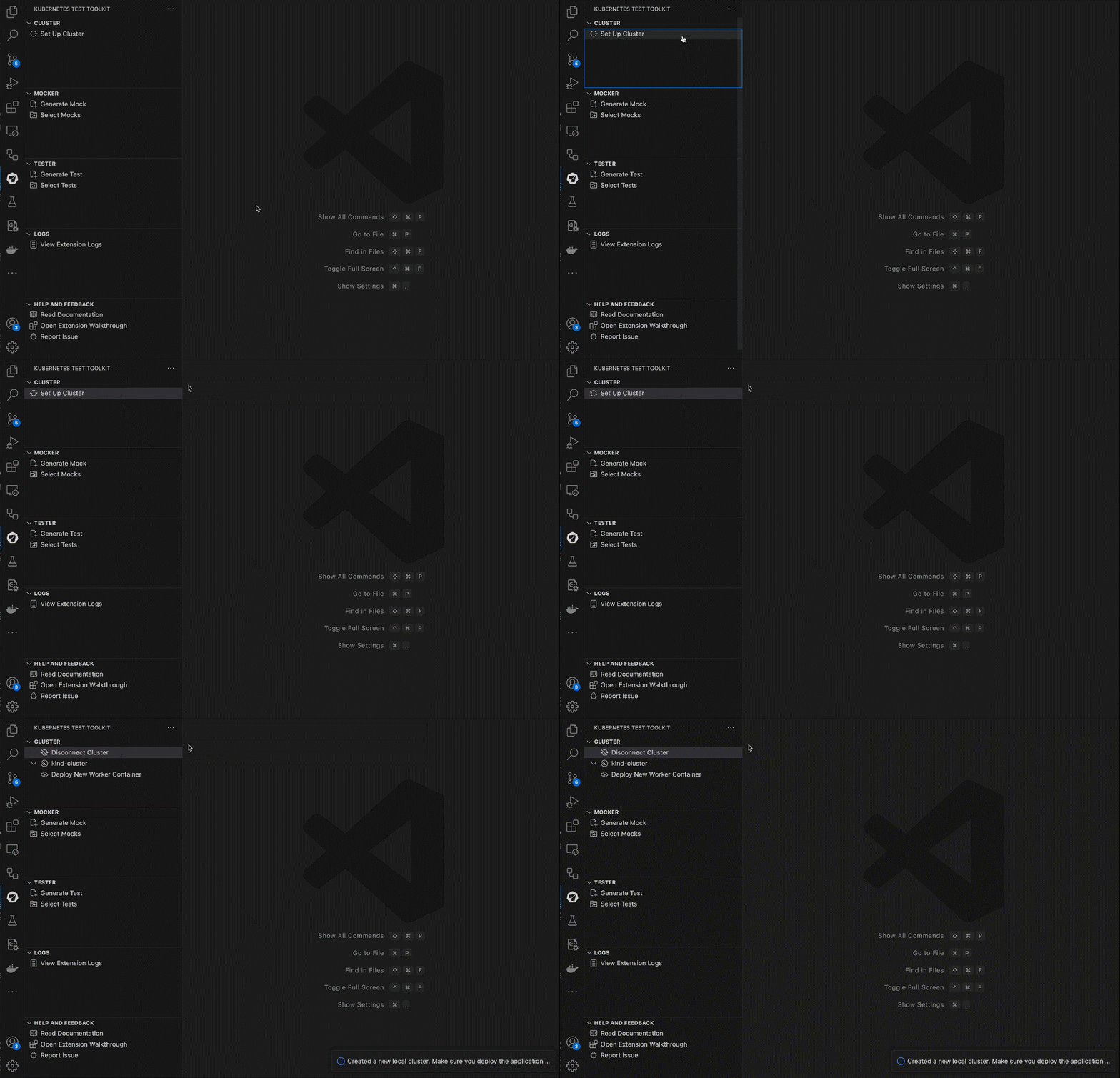
Note: Please be aware that provisioning a local cluster is supported only on MacOS or Linux. On Windows, you can only connect to an existing cluster.
2. Deploy New Worker Container
Next, install the Worker container in your cluster by running the Deploy New Worker Container command.

Mocker
How Mocker works
Mocker is an in-cluster solution for creating API mock servers. Refer to the Mocker page to learn more about how Mocker works. You can follow the following steps to use Mocker in the VS code extension:
1. Generate Mock
When you’re ready to mock a service, run the Generate Mock command to generate a mock configuration in the form of a .yaml file in the mocks folder of your working directory. You will be prompted to select an API schema file to mock against, and input some necessary configuration details including the Kubernetes service name, port number, and proto service name (if applicable).
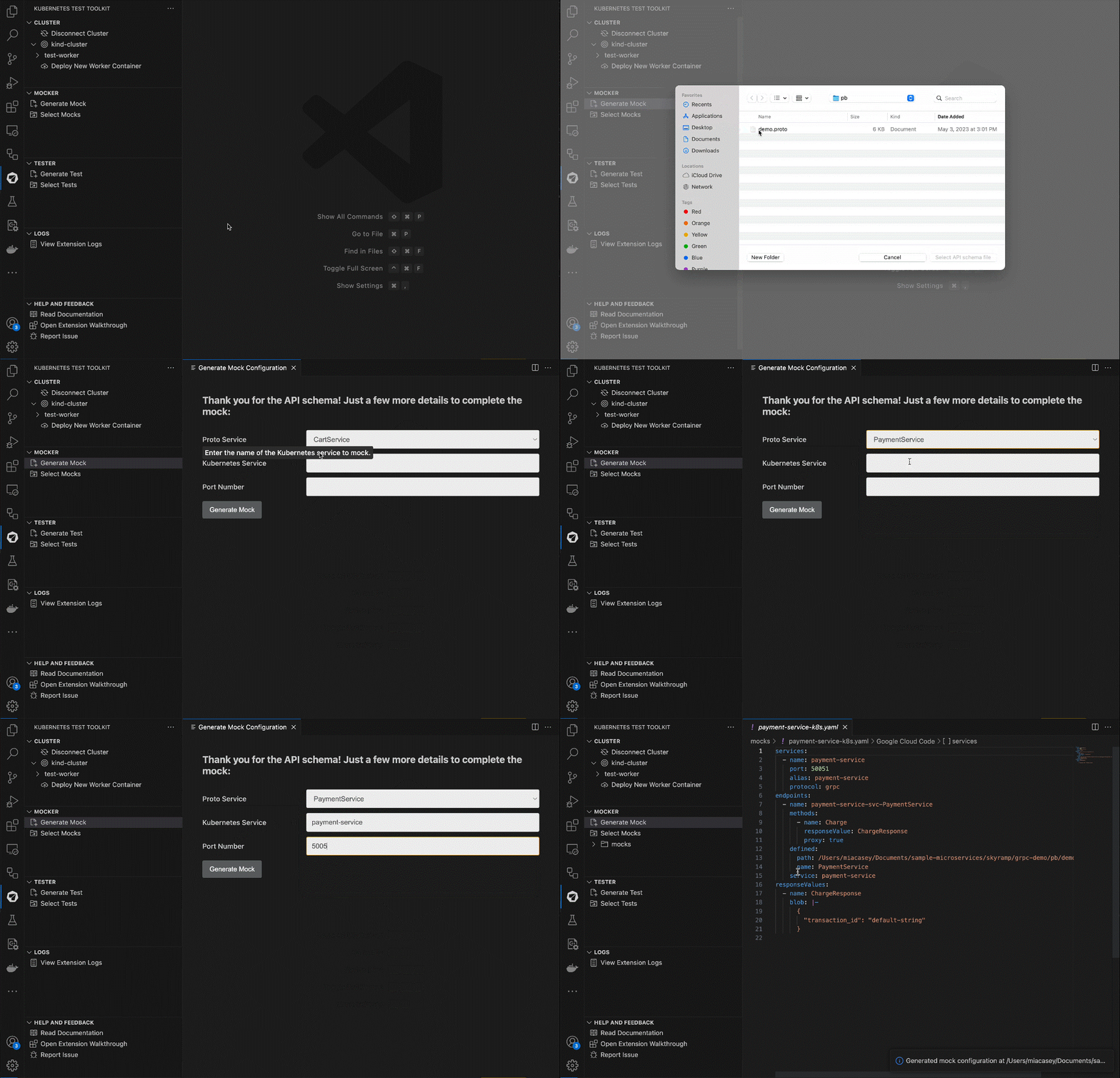
Tip: We recommend running the generate command in your source code repo so mocks are versioned and shareable across your team.
2. Edit Mock
Mocker generates default values for responses based on the API signature. You can edit the default values by editing the generated mock in the mocks folder.
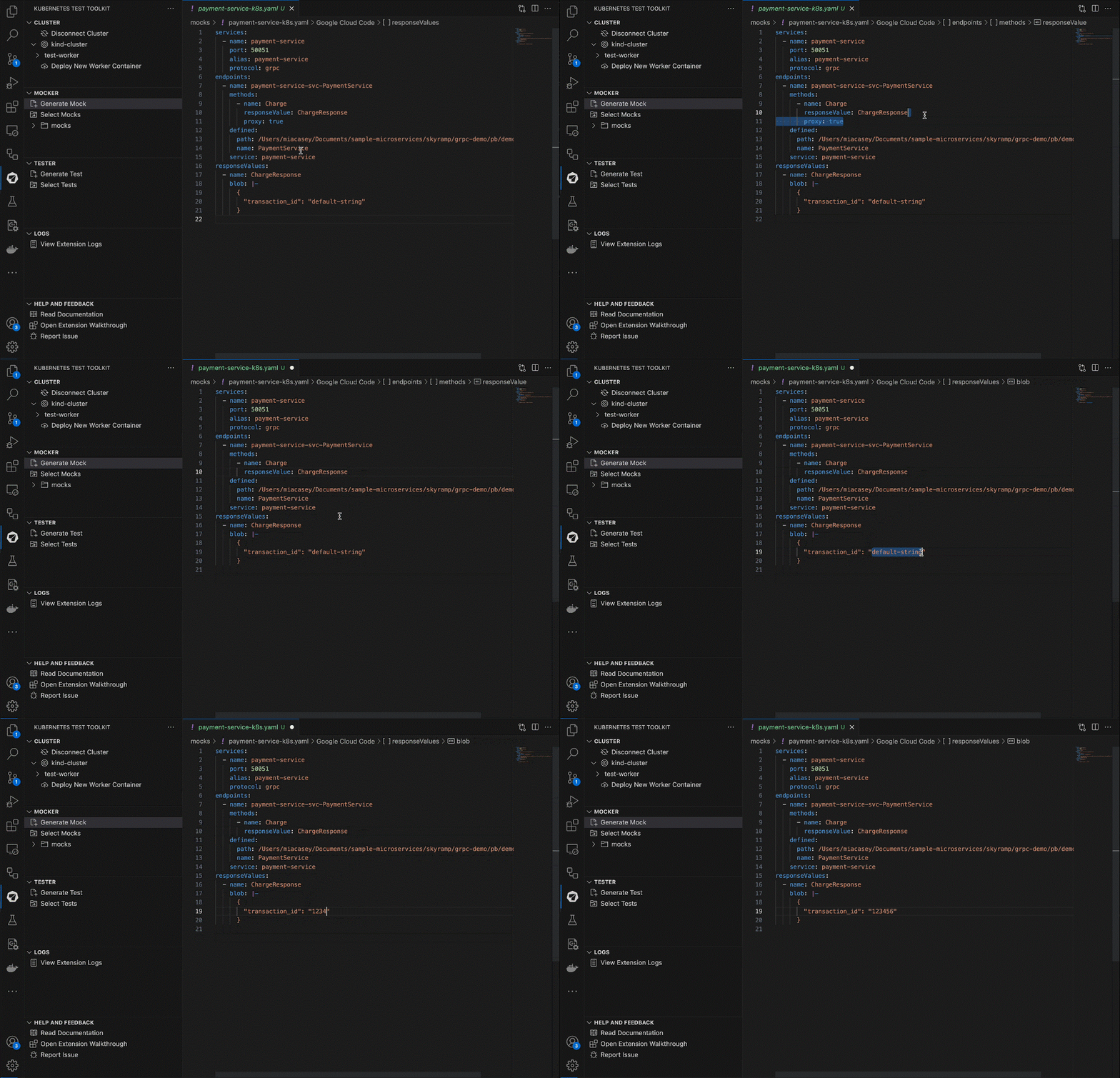
Note: Read more about writing mock configurations here
3. Apply Mock
Now, you can push the mock configuration to Mocker by running the Apply Mocks command:
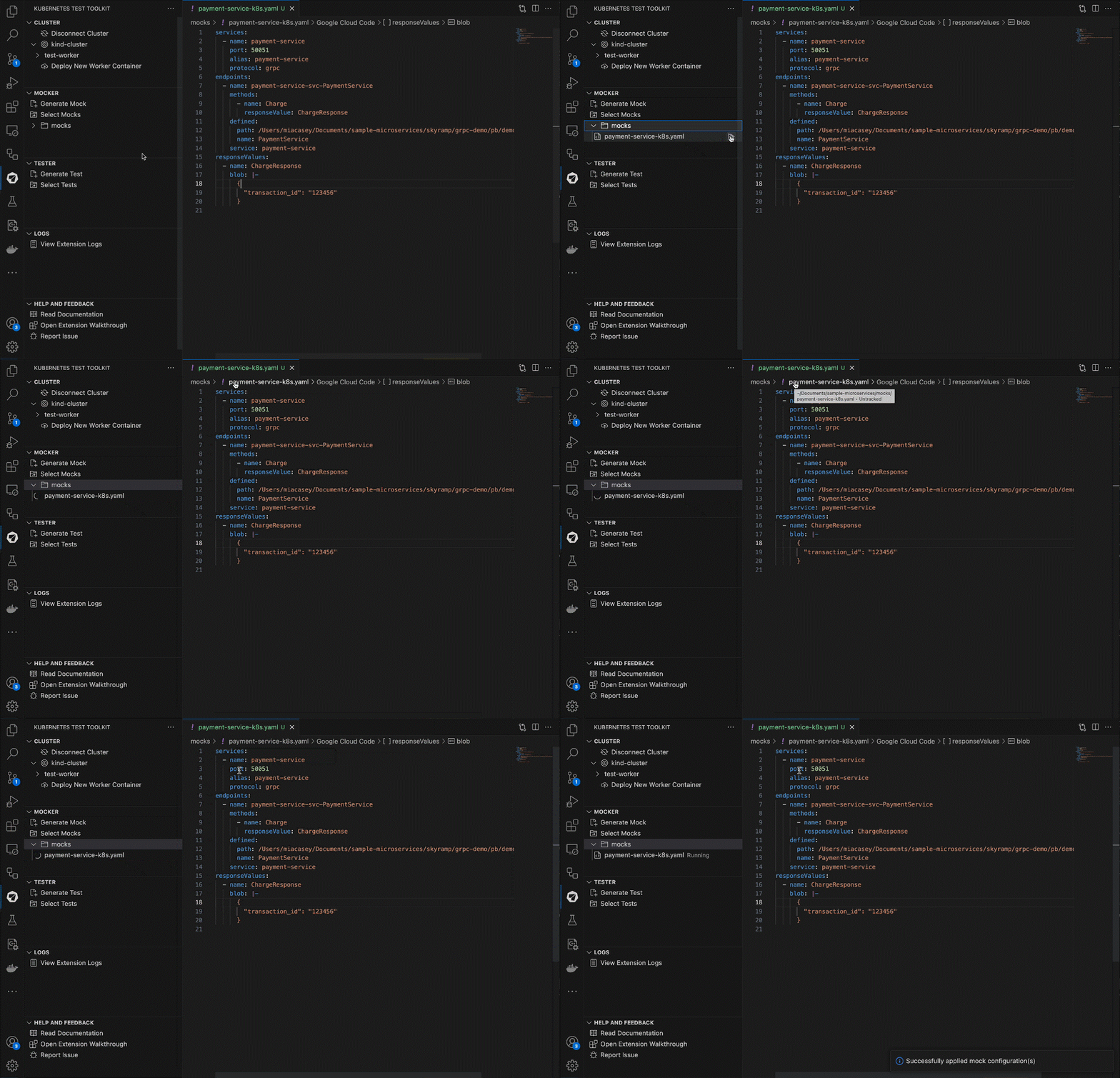 That’s it! All calls to the mocked service/s are now routed to Mocker and it responds with the default values in the configuration.
Note: Mocker does not automatically update the mocks when the responses are updated in the mock configuration file. You can run the
Apply Mockscommand again when your mock values change. Note: When mocking a gRPC service the container needs to be redeployed if the proto definition of the mock changes.
Tester
How Tester works
Tester is a solution that simplifies the process of both writing and running tests for complicated distributed apps. Refer to the Tester page to learn more about how Tester works. You can follow the following steps to use Tester in the VS code extension:
1. Generate Test
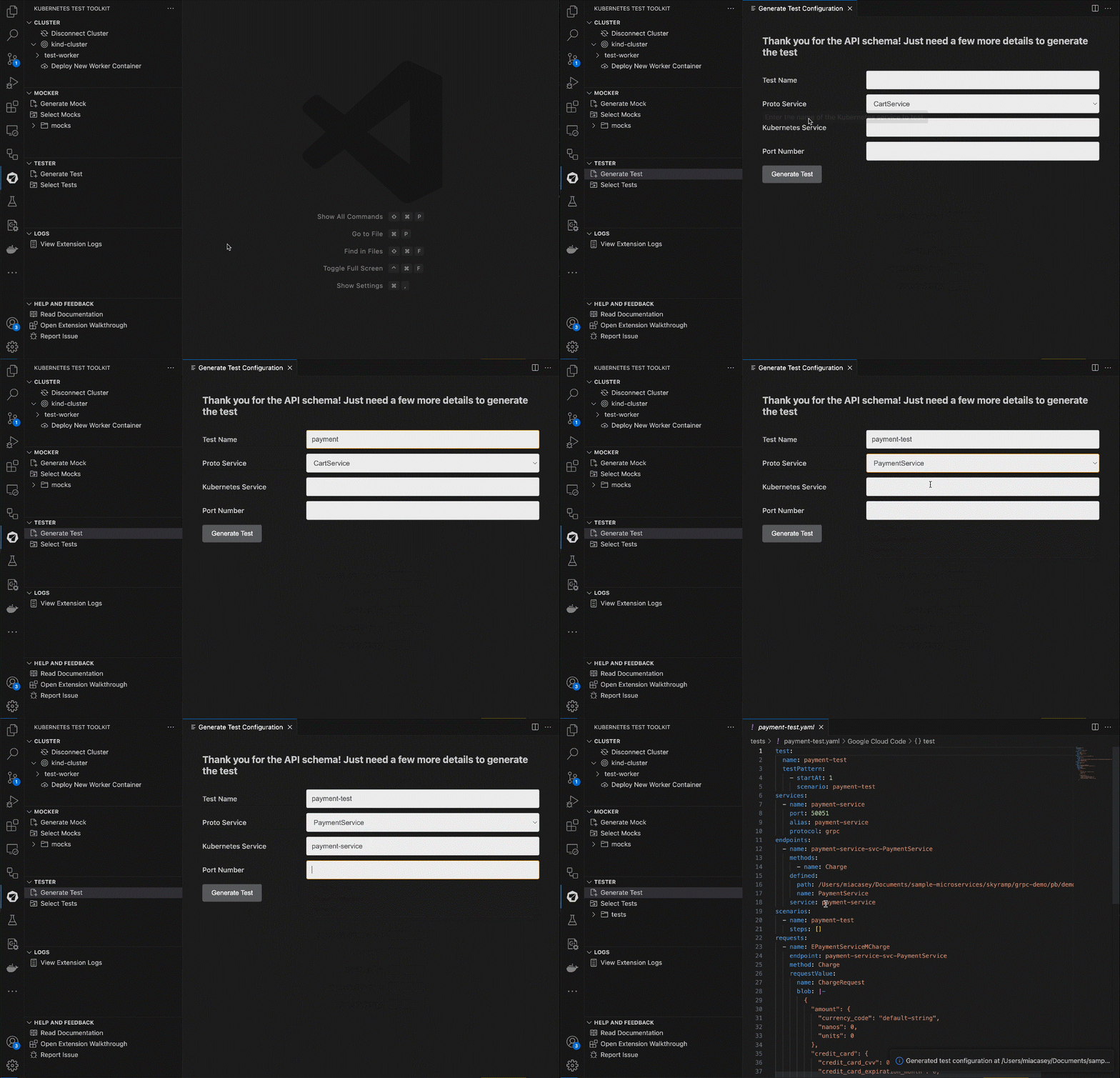
When you’re ready to test a service, run the Generate Test command to generate a test configuration in the form of a .yaml file in the tests folder of your working directory. You will be prompted to select an API schema file to test against, and input some necessary configuration details including the test name, Kubernetes service name, port number, and proto service name (if applicable).
2. Edit Test
Tester generates default values for requests based on the API signature. You can edit the default values and add request steps by editing the generated test in the tests folder.

Note: Read more about Tester and writing test configurations here
3. Start Test
Now, you can start the test configurations by running the Start Test command:
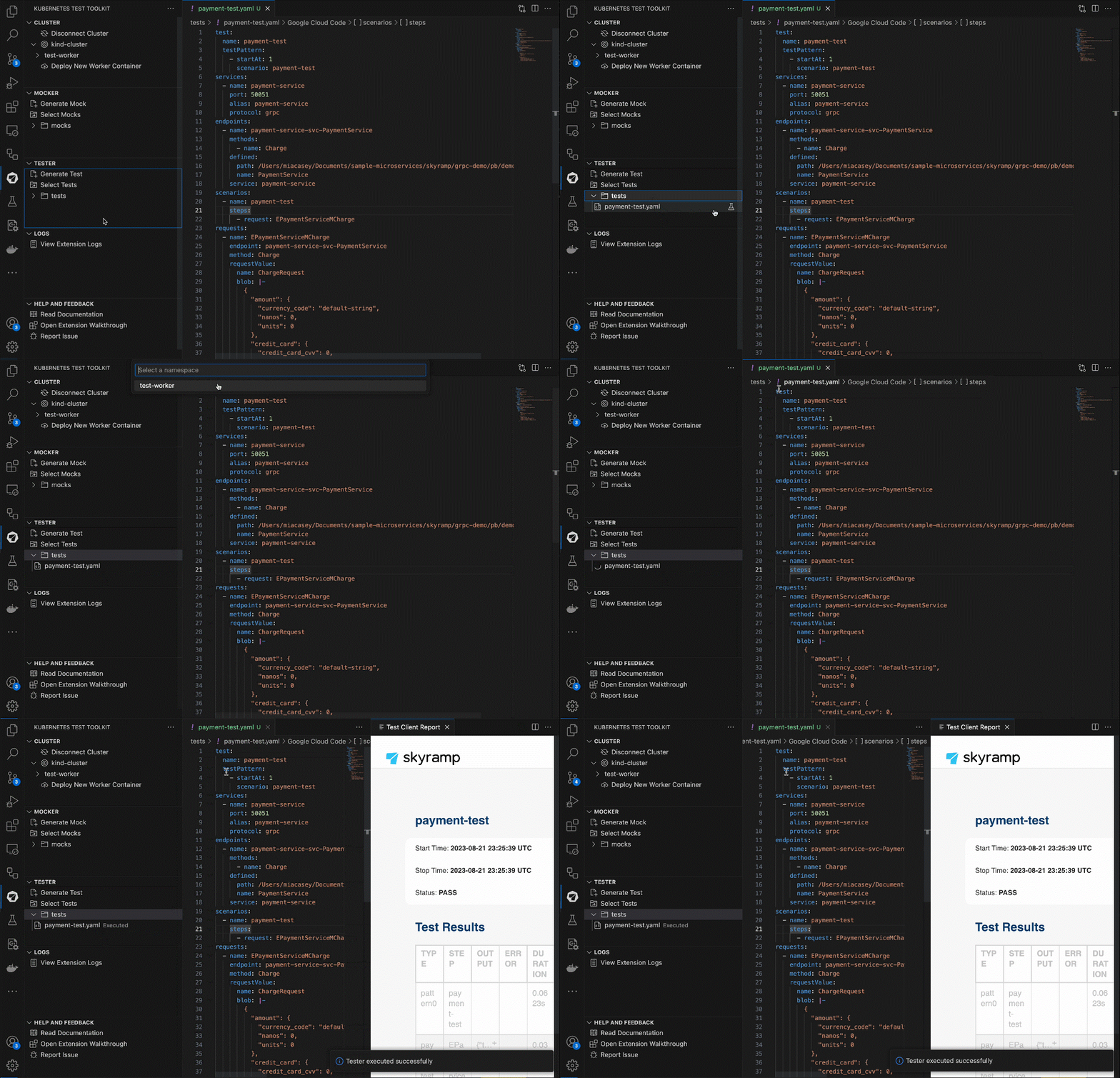 That’s it! Tester will execute the test and output on the test results in the
 results output directory.
Requirements
Helm
The Worker container is installed in your cluster via Helm. In case you don’t have Helm installed, refer to Helm’s documentation to get started.